In the world of network security and cybersecurity, understanding how a packet is formed, how it can be manipulated, and how to craft custom packets is a crucial skill. The Python programming language and the Scapy library provide an excellent platform for learning these skills. In this post, I will detail step-by-step the fundamentals of creating and analyzing network packets using Scapy.
1. What is Scapy and Why is it Important?
Scapy is a powerful network packet manipulation library written in Python. Essentially, it allows us to:
Capture network traffic (sniffing)
Inspect and analyze packets
Create custom packets (crafting)
Modify packets (manipulation)
Simulate network tests and security scenarios
Scapy’s power comes from its ability to be used in both passive and active network tasks. Passively, we can analyze existing traffic on the network; actively, we can send custom packets to target systems and perform response analysis.
2. Basic Concepts
Before performing packet manipulation and crafting, it is very important to understand the structure of network packets. Network packets are directly related to the layers of the OSI model:
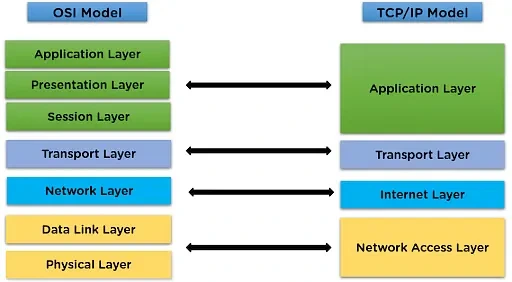
Ethernet (Data Link Layer): Ensures the transmission of packets on the physical network. Contains source and destination MAC addresses.
IP (Network Layer): Ensures the routing of packets across networks. IP addresses reside here.
TCP/UDP (Transport Layer): Data transport protocols. TCP is connection-oriented, whereas UDP is connectionless.
Application Layer: High-level protocols such as HTTP, DNS, and FTP reside here.
With Scapy, we can perform packet manipulation at every layer. For example, we can change the port number of a TCP packet, spoof an ICMP packet, or forge DNS queries.
3. Core Logic of Working with Scapy
When working with Scapy, it is necessary to understand three fundamental concepts:
Packet Crafting: When creating a packet with Scapy, we can think of each layer as an independent object. For example, you create an IP layer, a TCP layer, and a payload (data) layer, and stack/bind them together using the slash (/) operator.
Sending Packets: To send the packet you crafted, we use Scapy’s functions such as
send()orsr().send()is typically used for the TCP/IP (Layer 3) level, whilesendp()is used for the Ethernet (Layer 2) level.Packet Sniffing: We use the
sniff()function to capture packets on the network. This is essential for real-time analysis and attack simulations. We can filter traffic to capture only specific protocols or ports.
Now, these sections will be explained in detail.
4. Packet Crafting
In Scapy, packet crafting essentially means designing the network data unit (packet) as you desire. The logic here operates across OSI layers:
Layer Logic
Each layer represents a layer in the OSI model: Ethernet (Layer 2), IP (Layer 3), TCP/UDP (Layer 4), Payload (Layer 7).
Each layer is created as an independent object. For example,
IP()is an IP layer object, andTCP()is a TCP layer object.Layers are stacked on top of each other using the
/operator. That is:
Ethernet / IP / TCP / Payload
Constructing this structure determines how the packet will be transported across the network and how the destination will interpret it.
Bind Logic
The lower layer acts like the carrier layer for the upper layer. In other words, TCP is carried over IP, and IP over Ethernet.
The bind logic is implemented in Scapy using the
/operator. Example:ip_layer / tcp_layer / Raw("data").This creates a natural packet hierarchy according to the OSI model.
Crafting Logic
First, we select which protocol to use (IP, TCP, UDP, ICMP).
You customize the fields of the layer:
IP:
src,dstTCP:
sport,dport,flagsPayload:
Raw(load="data")
You combine the layers using
/.Your packet is now crafted and ready to be sent.
Example Logic Flow:
You want to send a TCP SYN packet to a target IP.
Create IP layer → Create TCP layer → Add payload (optional) → Combine with
/→ Packet is ready.
Python
packet = IP(dst="192.168.1.30") / TCP(dport=80, flags="S") / Raw(load="Hello World!")
5. Sending Packets
Sending the crafted packet is just as critical a step as creating it. Scapy allows us to do this at two main levels:
5.1 Network Layer (IP Layer) Transmission
send()orsr()is used for packets at the TCP/IP layer.send(): Sends the packet and does not wait for an answer.sr(): Sends the packet and waits for a response; typically used in request-response scenarios.
Logic: We are sending the IP layer to the destination. TCP or UDP sits on top of this layer, and the payload is carried above that. Here, the transmission takes place at the IP layer, not “from Layer 2.” We are operating at the Layer 3 level according to the OSI model.
5.2 Data Link Layer (Ethernet Layer) Transmission
sendp()orsrp()is used for packets at the Ethernet level.At this level, MAC addresses are directly relevant.
We are operating at Layer 2 according to the OSI model.
Logic: We send data over the Ethernet frame without relying on the operating system to construct the Layer 2 header. This is generally used in low-level testing or intra-LAN scenarios.
6. Packet Sniffing
Sniffing is capturing and analyzing network packets in real time. Scapy accomplishes this via the sniff() function.
Sniffing Logic
Filtering:
Instead of capturing all traffic, we can filter for specific protocols (TCP, ICMP, UDP) or ports.
Example:
filter="tcp and port 80"
Layer-by-Layer Analysis:
Captured packets can be analyzed in detail using
packet.show().Layers can be viewed individually: IP, TCP, payload.
Real-Time Capture or File Export:
sniff(count=10)captures 10 packets.It is possible to save captured packets to a pcap file for later analysis.
Once you properly grasp these three steps — crafting, sending, and sniffing — you can both analyze the data flow across OSI layers and manipulate it in a controlled manner for security testing.